How to Update Your One Academy Password
If you want to update your One Academy Platform password for any reason, you first need to:
1. On your dashboard click the drop-down next to your profile photo and select Manage Account.
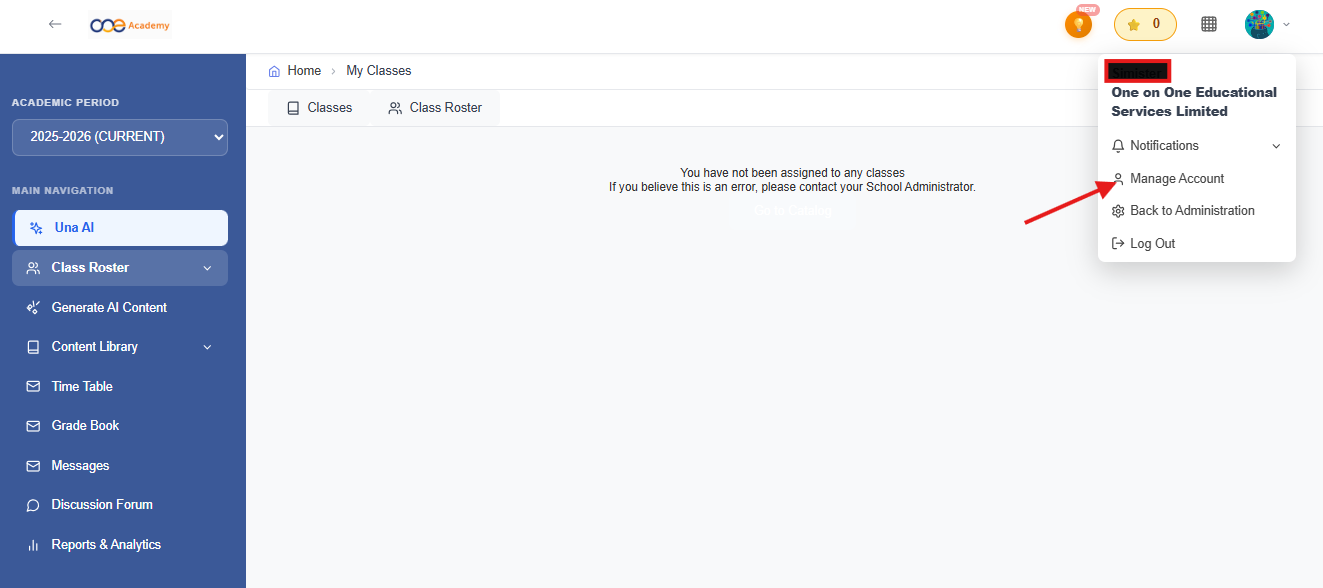
2. Click Change Password and follow the instructions.
3. Once you are finished and click Update Password and your password will be updated successfully.
Related Articles
How To Sign Up as a Teacher on One Academy
Signing up as a Teacher on One Academy is pretty simple. Follow these steps provided to start the One Academy Journey! Firstly, you'll start off by heading to https://schools.oneacademy.com/signup, selecting the "I'm a Teacher" button. You'll be ...School System Administrator Account Password Reset (For Users)
If you wish to update the password of a user within your school (teacher/student), you can easily do so by following the steps below: Once you are on your school's dashboard, click the "Users" option on the left hand side of the screen There you will ...How To Sign Up as a Student on One Academy
Signing up as a Student on One Academy is pretty simple. Follow these steps provided to start the One Academy Journey! Firstly, you'll start off by heading to https://schools.oneaademy.om/signup, selecting the "I'm a Student" button and start ...How to Sign In to One Academy's National Virtual School Platform
Welcome to our online platform! Follow the simple steps below to log in and start using the system. Step 1: Access the Platform Open your preferred web browser (e.g., Google Chrome, Safari, Microsoft Edge). Go to the platform's login page using this ...Forgot Your Password? Let's Reset Your Password
If you’ve forgotten your password, don’t worry! You can easily reset it by following these steps. Step-by-Step Instructions Go to the Login Page Navigate to the login screen of the platform. Click “Forgot password?” Beneath the login form, select the ...